
Setting up Stripe Billing with Mantle
How to draw an owl:
-
Consider creating a development application in Mantle so you’re not working with your production data
-
Make sure Stripe is connected to your application in Mantle with the proper permissions
- You already have this in your production app, but…
- You’ll likely need to add a new token (or update the existing one if possible) which gives write access so we can create checkouts on your behalf
-
Create Mantle API key(s)
- You have a production Mantle API key already
- Create webhooks for
subscriptions/activate,subscriptions/cancel,customers/installedandcustomers/reinstalled- more on this later
-
When your sales person is working with a new customer and you want to bill them with Stripe:
-
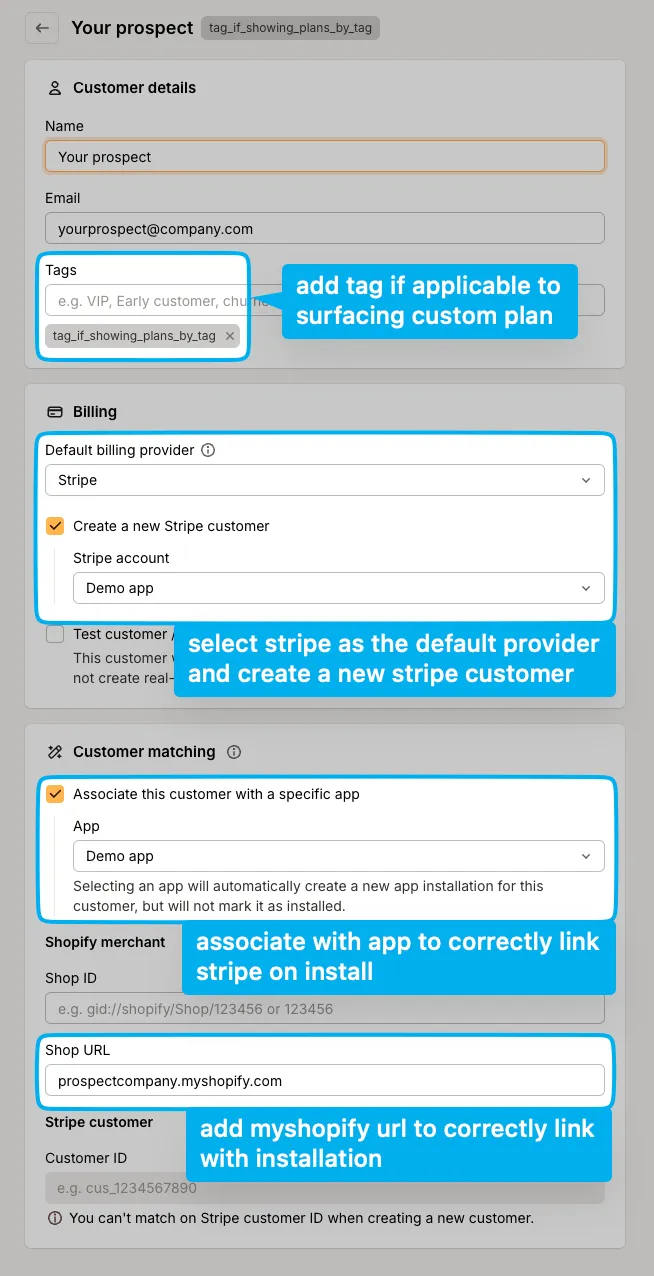
Go to your app in Mantle, select customers, “Add customer”
-
-
-
When you create the customer in Mantle using this method, it will automatically create the mantle customer, the app installation for the selected app and a new Stripe customer, which will all be linked together with magic glue
-
Ensure your app is set up to identify customers to Mantle during the auth step with Shopify (usually on install, reinstall, nightly syncs, etc)
-
Again, you’re already doing this, however…
-
If you’re not already, you should add a
mantleApiTokenfield to your coreShop(orUser?) model, this is so you can query the Mantle API to grab custom plans and current subscription, etc. Store theapiTokenreturned from/identifyin this fieldcurl --request POST \ --url https://appapi.heymantle.com/v1/identify \ --header 'X-Mantle-App-Api-Key: string' \ --header 'X-Mantle-App-Id: string' \ --header 'Content-Type: application/json' \ --data ' { "platform": "shopify", "platformId": "123456", "myshopifyDomain": "testshop.myshopify.com", "name": "testshop", "email": "[email protected]", "accessToken": "shpat_1234567890", "customFields": { "last_month_api_order_count": 1751 } } '
-
-
Assuming you created the above customer correctly in Mantle and have identify set up as above, when the customer installs the application it’s going to automatically link the installing customer to the customer in Mantle which will have Stripe billing enabled
-
Webhooks:
-
Listening for
customers/installedandcustomers/reinstalledyou will see there is a nested object containing information about the Stripe customer with thestripekey, which you can use to update some sort of flag on your ownShopmodel, maybe something likeuseMantleBillingor evenmantleStripeId{ "id": "95c9d365-9e1f-449a-bb87-9247c2dfc982", "app": { "id": "87d85dc5-a68d-4945-b69c-c2641c482097", "name": "mantle-dev-josh" }, "name": "josh-test-shop-7", "tags": [], "test": false, "email": "[email protected]", "topic": "customers/installed", "stripe": { "id": "cus_RnXkuufeYED0OG", "name": "josh-test-shop-7", "email": "[email protected]", "livemode": false, "createdAt": "2025-02-18T19:41:15.000Z" }, "shopify": { "id": null, "isPlus": false, "shopId": null, "planName": "Developer Preview", "isDevPlan": true, "myshopifyDomain": "josh-test-shop-7.myshopify.com" }, "platformId": "cus_RnXkuufeYED0OG", "installedAt": "2025-02-18T19:41:11.000Z", "subscription": null, "billingStatus": "none", "lifetimeValue": 0, "trialStartsAt": null, "uninstalledAt": null, "trialExpiresAt": null, "averageMonthlyRevenue": 0 } -
Listening for
subscriptions/activateorsubscriptions/cancelyou can determine whether or not the customer is or isn’t subscribed to a plan:{ "id": "c75abcaf-2781-434f-bbf0-b695ec9a1ac7", "plan": { "id": "600a32c0-88a4-4022-98f0-3bb0f6ebbaeb", "name": "Josh Test", "amount": 100, "public": true, "stripe": { "id": "price_1QtqFw746TATnPjbO1Y50zhF", "createdAt": "2025-02-18T12:50:32.000Z" }, "features": {}, "interval": "EVERY_30_DAYS", "createdAt": "2025-02-18T12:50:32.220Z", "trialDays": 0, "updatedAt": "2025-02-18T12:54:41.448Z", "description": "", "currencyCode": "USD", "customFields": {}, "usageCharges": [], "featuresOrder": [] }, "topic": "subscriptions/activate", "active": true, "stripe": { "id": "sub_1QtwUs746TATnPjbFN7iYHzH", "createdAt": "2025-02-18T19:30:22.000Z" }, "cancelOn": null, "customer": { "id": "eedc2285-d27f-43d3-914d-c78bde01d503", "name": "Joshua G", "tags": [], "test": true, "email": "[email protected]", "stripe": { "id": "cus_RnXWfWa3cheqI1", "name": "Joshua G", "email": "[email protected]", "livemode": false, "createdAt": "2025-02-18T19:27:00.000Z" }, "shopify": { "id": "73180446933", "isPlus": false, "shopId": "73180446933", "planName": "Developer Preview", "isDevPlan": true, "myshopifyDomain": "josh-test-shop-5.myshopify.com" }, "platformId": "73180446933", "installedAt": "2025-02-18T19:26:57.000Z", "billingStatus": "active", "lifetimeValue": 0, "trialStartsAt": null, "uninstalledAt": null, "trialExpiresAt": null, "averageMonthlyRevenue": 0 }, "features": { "included_messages": { "id": "7bef30d2-1deb-4398-b8b3-a24bc32a2e81", "name": "Included messages", "type": "limit", "value": 0, "description": "The number of messages you can send in a particular month", "displayOrder": 0 } }, "frozenAt": null, "createdAt": "2025-02-18T19:27:56.883Z", "canceledAt": null, "activatedAt": "2025-02-18T19:30:22.000Z", "usageCharges": [], "featuresOrder": [ "included_messages" ], "confirmationUrl": "https://checkout.stripe.com/c/pay/cs_test_a139H0eN7D5rnW58qNID1MnlpJFeCyfk4PklM2j50z7k7jZkk5d9cSkbVk#fid2cGd2ZndsdXFsamtQa2x0cGBrYHZ2QGtkZ2lgYSc%2FY2RpdmApJ2R1bE5gfCc%2FJ3VuWnFgdnFaMDRUcWtxVzIxM1FEUWtVb2dqMk8zXXFNTkg0aU1fdk5VUnVuNkBAN1VzZEA1VWI0b2tNS1VcVHFnTkFPdlVzVVNxPEtkVUN1NnM9U2ZwYF83Z39mU0NJcWs1NUtDNHNJM1Y8JyknY3dqaFZgd3Ngdyc%2FcXdwYCknaWR8anBxUXx1YCc%2FJ3Zsa2JpYFpscWBoJyknYGtkZ2lgVWlkZmBtamlhYHd2Jz9xd3BgeCUl", "currentPeriodEnd": "2025-03-18T19:30:22.000Z", "currentPeriodStart": "2025-02-18T19:30:22.000Z" } -
Again, using the above you can track the current subscription status
-
-
Now, the rest is more or less up to you! Now that you have the
mantleApiTokenstored on yourShop, you can use this to query other parts of the API, such as/subscriptionsor/customer-
Assuming you stored
mantleStripeIdorhasMantleBillingyou can use those fields to effectively feature gate the Stripe billing plans page (or just show the custom plan exactly where you do right now) -
With
/customeryou can get information about the customer/shop which was identified, and do things like expose a list of planscurl --request GET \ --url https://appapi.heymantle.com/v1/customer \ --header 'X-Mantle-App-Id: string' \ --header 'X-Mantle-Customer-Api-Token: string' -
With the above, you’ll get a response similar to this:
{ "customer": { "id": "8fca5ac8-6b79-4411-92cd-46d9560479c9", "test": true, "installedAt": "2024-02-26 12:33:19", "trialStartsAt": "2024-02-29 00:00:00", "trialExpiresAt": "2024-03-12 00:00:00", "billingStatus": "active", "plans": [ { "id": "96e30ffb-cd18-43ec-8fd7-8b2a21320412", "name": "Pro", "description": null, "currencyCode": "USD", "public": true, "trialDays": 14, "interval": "EVERY_30_DAYS", "availability": "public", "createdAt": "2023-09-02 15:53:15", "updatedAt": "2024-03-01 00:32:16", "features": {}, "featuresOrder": [], "usageCharges": [], "usageChargeCappedAmount": null, "customFields": {}, "discounts": [], "autoAppliedDiscount": null, "total": 10, "subtotal": 10, "amount": 10, "eligible": true } ], "subscription": { "id": "8fca5ac8-6b79-4411-92cd-46d9560479c9", "plan": { "id": "96e30ffb-cd18-43ec-8fd7-8b2a21320412", "name": "Pro", "description": null, "currencyCode": "USD", "public": true, "trialDays": 14, "interval": "EVERY_30_DAYS", "availability": "public", "createdAt": "2023-09-02 15:53:15", "updatedAt": "2024-03-01 00:32:16", "features": {}, "featuresOrder": [], "usageCharges": [], "usageChargeCappedAmount": null, "customFields": {}, "total": 10, "subtotal": 10, "amount": 10 }, "active": true, "billingCycleAnchor": "2024-04-11 00:00:00", "currentPeriodStart": "2024-03-12 00:00:00", "currentPeriodEnd": "2024-04-11 00:00:00", "trialStartsAt": "2024-02-29 00:00:00", "trialExpiresAt": "2024-03-12 00:00:00", "activatedAt": "2024-02-29 21:37:25", "canceledAt": null, "frozenAt": null, "features": {}, "featuresOrder": [], "usageCharges": [], "createdAt": "2024-02-29 21:37:20", "confirmationUrl": "...", "shopifySubscription": { "id": "gid://shopify/AppSubscription/123456" }, "appliedDiscount": null, "subtotal": 10, "total": 10 }, "features": {}, "usage": {}, "customFields": { "Extras": { "demo": true }, "traffic_source": "twitter", "free_plan_product_limit": 5, "test123": "50" }, } } -
With
/subscriptionsyou can create a new subscription using aplanIdreturned by the/customerAPI:curl --request POST \ --url https://appapi.heymantle.com/v1/subscriptions \ --header 'X-Mantle-App-Id: string' \ --header 'X-Mantle-Customer-Api-Token: string' \ --header 'Content-Type: application/json' \ --data ' { "planId": "", // the plan to subscribe to "returnUrl": "" // where to redirect after the checkout is complete } ' -
Redirect to the
confirmationUrlreturned by calling the above, which will present the Stripe checkout for the customer to pay
-
-
Plans
- Assuming you gave the Stripe token the correct permissions, when you create a new plan in Mantle it will create a corresponding Stripe price
- Use plans which are scoped to a customer or by a specific tag so only the shop you want can see and subscribe to the plans
Updated over 1 year ago