
Usage metrics
Usage metrics transform raw usage events into aggregated insights about customer behavior and app usage. They provide the foundation for usage-based billing, feature entitlements, and business analytics. This guide covers the essentials of implementing usage metrics in your app.
What to measure
Consider creating metrics for these common use cases:
Business metrics
- Activity volumes (e.g., total orders processed per month)
- Resource utilization (e.g., storage consumed, API calls made)
- Value measurements (e.g., total revenue processed, average order value)
- Feature adoption (e.g., number of users engaging with specific tools)
Billing metrics
- Consumption for metered billing (e.g., orders processed above plan limit)
- Percentage-based charges (e.g., percentage of sales value)
- Tiered usage thresholds (e.g., pricing that changes at different volumes)
- Feature-specific usage (e.g., premium reports generated)
Creating usage metrics
Once you're sending usage events, create metrics in Mantle to make them actionable:
- Navigate to Usage metrics in your app's sidebar
- Click Add Usage metric
- Configure your metric:
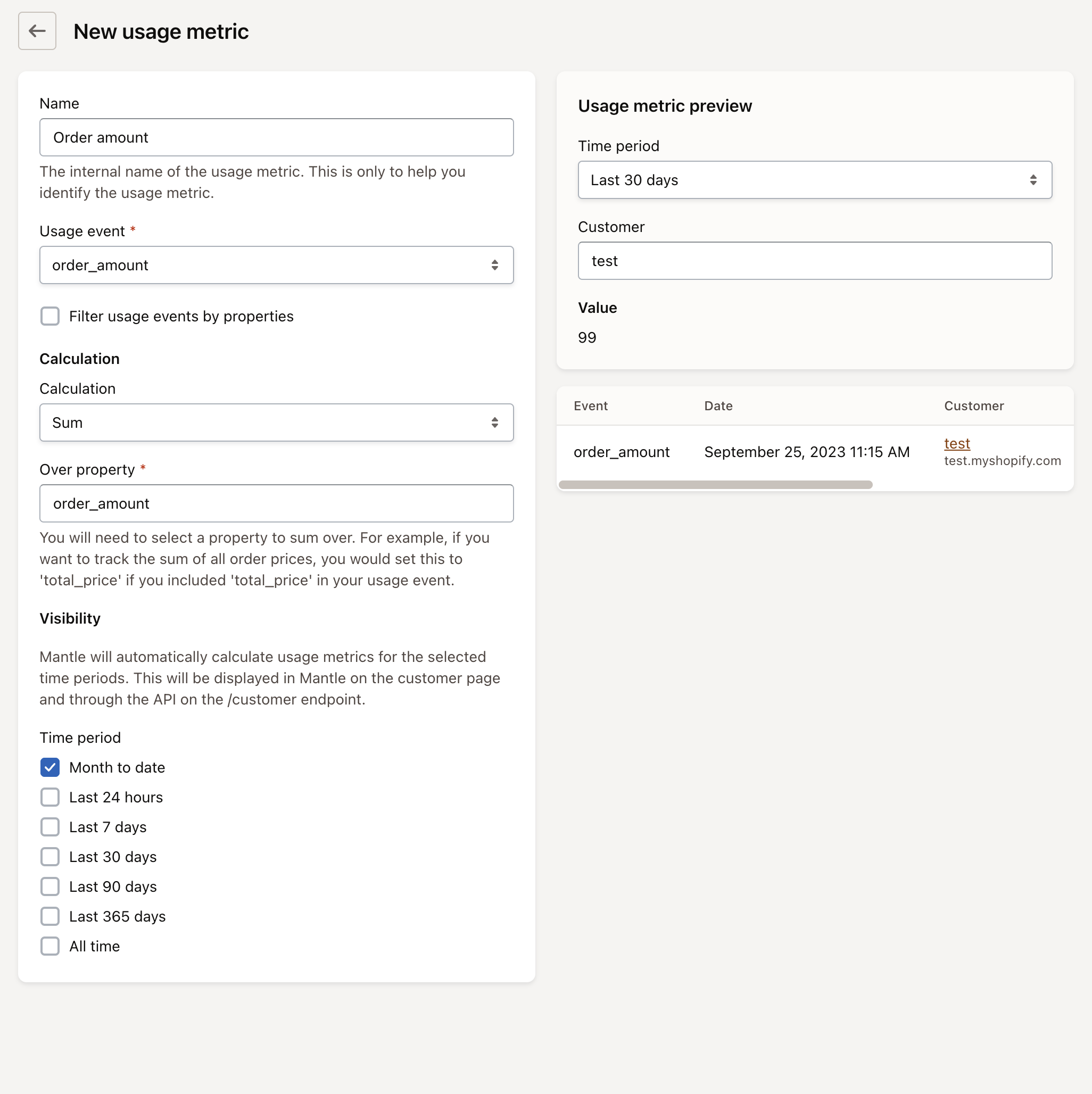
Settings
| Setting | Description | Example |
|---|---|---|
| Name | Internal name of the usage metric | "Order amount" |
| Usage event | Which usage event to track | "order_amount" |
| Calculation | How to calculate (Count or Sum) | "Sum" for totaling values |
| Over property | For Sum calculation, which property to sum | "order_processed" |
| Time period | Window for measurement | "Month to date", "Last 24 hours", "Last 7 days", etc. |
Calculation methods
Mantle offers two calculation methods for usage metrics:
Count
Simplest method - tallies how many times an event occurs:
- Usage: Track overall volume of activities or operations
- Example: Count of order_processed events to track total orders
- Implementation: Select "Count" as the calculation method
Sum
Adds up a specific property value across all matching events:
- Usage: Track cumulative values like revenue or resource consumption
- Example: Sum of order_amount property from an event
- Implementation: Select "Sum" as the calculation method and specify which property to sum over
Note: You will need to select a property to sum over, such as 'total_price' if you included it in your usage event
Visibility and access
As noted in the interface, Mantle will automatically calculate usage metrics for the selected time periods. This will be displayed in Mantle on the customer page and through the API via our customers endpoint
The metrics you create will be available:
- In the Mantle UI on customer profiles
- Through the /customer endpoint in the API response
- For use in various billing and feature entitlement scenarios
This makes it easy to display usage information to customers or implement feature gating based on current usage levels.
Connecting metrics to billing
Once you've created usage metrics, you can connect them to your pricing model to enable usage-based billing. For detailed instructions on setting up usage-based pricing with your metrics, please refer to our usage-based pricing guide.
Analyzing usage data
After creating usage metrics, you can analyze the data to gain insights into customer behavior and app usage patterns. Mantle provides a dedicated Usage Metrics report that allows you to:
- Track usage trends over time
- Compare usage across different customer segments
- Identify your most active users
- Spot potential upsell opportunities
For comprehensive details on how to analyze your usage metrics, refer to our Usage metrics report documentation.
Updated over 1 year ago